Skip to content

Posts by Pairach

Resources for Structural Equation Model (SEM)


This post lists some SEM resources available to learn online.
As I am adding and updating the list, if you know more useful resource  for SEM please leave then in the comments., Thank you 🙂

Tutorials

  1. SEM tutorial
    by David A. Kenney
  2. Wikia-Psychology
    Structural Equation Modeling including steps in performing SEM
  3. An Introduction to Structural Equation Modeling for Ecology and Evolutionary Biology
    by Jjarrett Byrnes

Software to fit SEM

  1. List of R packages for Structural Equation Model [url]
  2. SEM
    – Uses of packages in R (sem, OpenMx)
    Edinburgh R user group

Miscellaneous 

  • Prof. Karl Joreskog’s story by David Burns [url]

Using R to Analyse Tourism Data – Part 1: Visualising Tourist Profile


Tourism is an important sector in the global economy. In many countries, tourism is the main source of revenue, Thailand is one of them. However, tourism sector is a fast moving sector. It is very sensitive to various factors and also vulnerable. The tourism markets for each destination (country) are also very diverse. Tourism data are available and updated frequently. One of the most important report of national tourism statistics; number of tourist arrivals from each country of origin, their average length of stay and total receipt or expenditure. These tourism statistics are important but often reported separately due to the limitation of software used by analysts.

The following graph represents profile of international tourists in Thailand in 2005.

The picture above was produced in R with package ‘ggplot2’ using the code below.


# Step 1: Import data into R
exp05 <- read.csv("http://dl.dropbox.com/u/46344142/thai_tour_2005.csv", head = T)
# Step 2: Load 'ggplot2' package for plotting elegent data visualisation
library(ggplot2)
# Step 3: Specify x and y axis, label, size of the bubbles and colour of the region
exp <- ggplot(exp05, aes(x=number, y=length, label=country, size=receipt, colour = region))
# Step 4: Create a plot and add texts to x and y axis
exp + geom_point() + geom_text(hjust=0.7, vjust=2) + labs(x = "Number of Tourist Arrivals", y = "Length of Stay (days)") + scale_area("Receipt (M. USD)") + scale_colour_hue("Region")

Measuring Emergency Relief Performance of Thailand Floods in 2011


Background

Last year Thailand faced the worst floods in their history. The World Bank (2011) reported that the 2011 Thailand floods were “The biggest damages and losses were in the manufacturing sector, with a total of THB 1,007 Bn (USD 32 Bn approximately)”. The tourism and agricultural sector were also affected and losses approximately THB 95 Bn (USD 3 Bn) and THB 40 Bn (USD 1.3 Bn) respectively (The World bank, 2011).

Therefore, this study aims to evaluate the performance of organisations that took actions in emergency relief for this disaster. We measure performance based on their preparedness for such disaster as well as how they responded to the events. Data collected via GoogleDoc from 382 respondents (victims) were (A) explored and the (B) used to fit with the conceptual model of performance measurement for emergency relief logistics.

A. Preliminary Findings

  • Descriptive_GoogleDoc (in Thai)
    A chart below shows the proportion of organisations, which samples have got helps.
    Highest percentage is unknown organisation, followed by military agencies.
  • Interesting Info-graphic obtained using R

What we can get from R

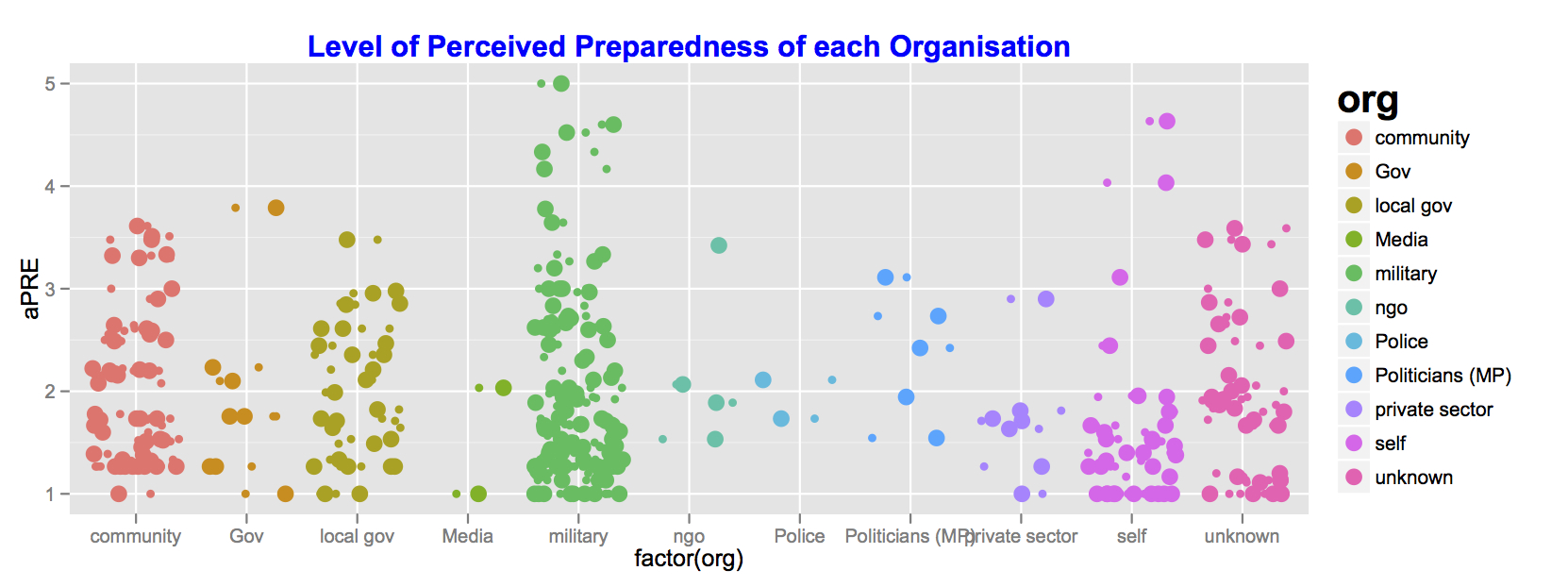
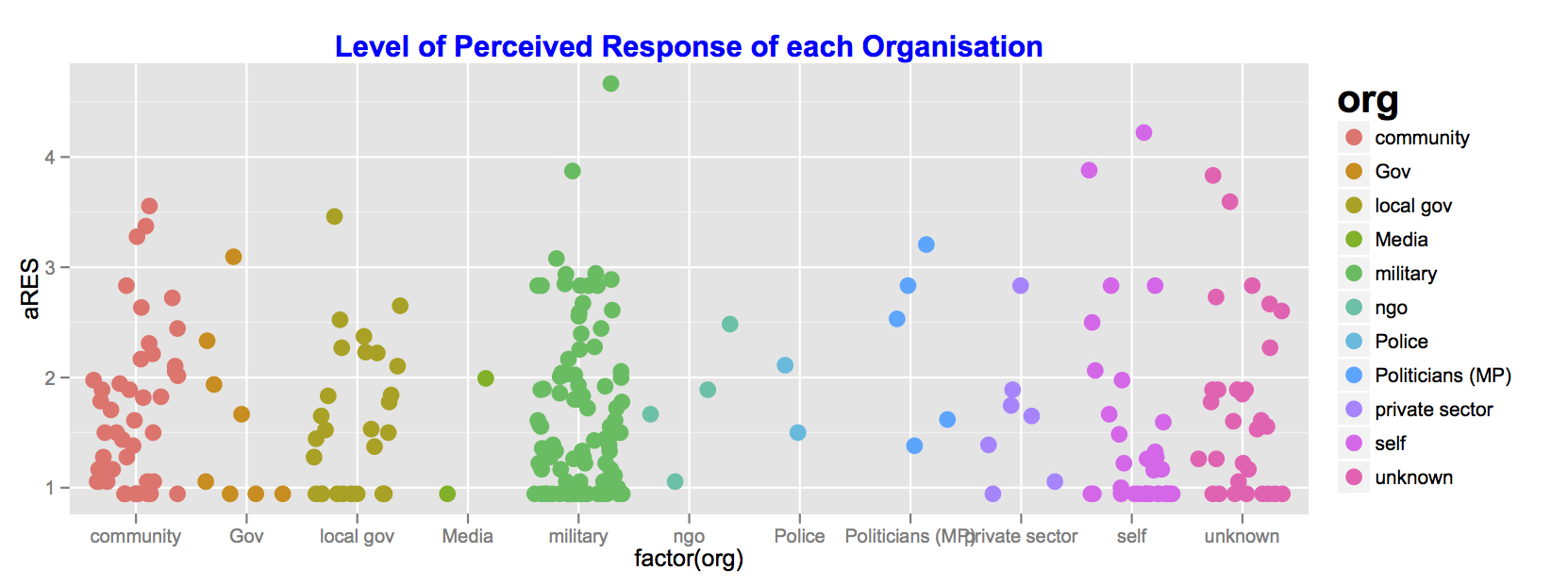
Moving away from the basic barplot instantly provided by Google Doc, we can do a better job to visualise what  people rate the performance of each organisation in terms of preparedness and response to the floods. An we can do so via R. Followings are what I produced in R.

1. Level Preparedness 
# Boxplot preparedness performance

k <- ggplot(flood, aes(factor(org), aPRE))

k + geom_jitter(aes(colour = org), size = 4) + opts(legend.title = theme_text(size = 20, face = "bold"), legend.text = theme_text(size = 10)) + opts(title = "Level of Perceived Preparedness of each Organisation") + opts(plot.title = theme_text(size = 15, face="bold", colour = "blue"))

2. Level of Responses
# Boxplot response perforance

c <- ggplot(flood, aes(factor(org), aRES))

c + geom_jitter(aes(colour = org), size = 4) + opts(legend.title = theme_text(size = 20, face = "bold"), legend.text = theme_text(size = 10)) + opts(title = "Level of Perceived Response of each Organisation") + opts(plot.title = theme_text(size = 15, face="bold", colour = "blue"))
<pre>

B. Theoretical Output: BAM2012 Paper

Title: Developing Measurement of Emergency Relief Logistics and Operations Performance: An Empirical Study of Thailand Floods in 2011

Summary

Albeit emergency relief logistics is an emerging field in operations, logistics and supply chain management, the development of performance measurement is still limited. Although one of the objectives of emergency relief logistics is to satisfy customers (victims in the disaster) the development of performance measurement based on victim’s perspective is limited. Then this study propose a measurement of emergency relief logistics performance and tested with an empirical data from the Thailand floods in 2011. We fit the propose measurement model with the data of 382 respondents using Confirmatory Factor Analysis with Mplus version 6 and R version 2.14.1. The result shows that the model is fit with the data. It was found that response had the highest contribution to the total performance, followed by preparedness and recovery respectively. The result also shows that information, operations and evacuation have different contribution to the performance of each stage.

Keywords: Humanitarian logistics, Emergency relief, disaster, floods, Thailand

Download: pdf

R code used in the paper

</pre>
library(lavaan)
 flood1.cfa <-'

PRE =~ x411 + x412 + x413 + x414 + x415 + x416
 + x421 + x422 + x423 + x424 + x425
 + x431 + x432 + x433 + x434

RES =~ x511 + x512 + x513 + x514 + x515 + x516
 + x521 + x522 + x523 + x524 + x525 + x526 + x527
 + x531 + x532 + x533 + x534 + x536

REC =~ x611 + x612 + x613 + x614 + x615 + x616 + x617
 + x621 + x622 + x623 + x624 + x625 + x626 + x627
 + x631 + x632 + x633 + x634 + x636

PEF =~ PRE + RES + REC

'
 fitFlood1 <- cfa(flood1.cfa, data=flooddata)
 summary(fitFlood1, standardized=TRUE, fit.measures=TRUE)
<pre>

How to develop R packages [resources]


One of the advantages of R is its add-on packages which are now 3,759 packages freely available in CRAN (May 1, 2012). I have been using R for my research since 2010. These packages have brought me to R. It is also the main reason why I am mainly use R (90%) for my research and teaching. Great packages like ggplot2 or iplot (for graphics) as well as sem or lavaan for (Structural Equation Model) are the good examples why many people are migrating to R.

Hence, I also would like to contribute to R more by writing some packages that would be useful to my subject areas (Economics, Supply Chain Management and Tourism). I wish I can have three packages (hopefully called econ, scm, and tour) that contains data sets, functions that help researchers, teachers and students in my fields benefit the uses of R in the future.

As I have no experience in writing any software or computer package before, I have search around the Internet and as usual there are lots of stuffs on how to create a package in R. Followings are the list of resources I found. Hope that one who also want to write an package will find the list useful.

==================================================================================================

*UPDATE (23 Oct 2012): I just found a new feature of R Studio for package development (with RStudio v0.97 or higher). I believe that this is gonna be a big hit soon.

Useful resources for creating R packages / extensions

General guides / tutorials

  1. Writing R Extensions [url]
    by R Core Team
  2. Creating R Packages: A Tutorial [pdf, 19 pages]
    by Friedrich Leisch
  3. R development master class [San Francisco, Canberra]
    by Hadley Wickham 
  4. Creating R Packages, Using CRAN, R-Forge, And Local R Archive Networks And Subversion (SVN) Repositories (pdf, ppt, 2009-05-04, 45 slides)
    by Spencer Graves and Sundar Dorai-Raj
  5. How To Make an R Package Based on C++ And Manage It With R-Forge: A Tutorial [pdf]
    by Jose M. Maisog
  6. Creating an R package, using developer/productivity tools [url, Youtube (1:28:53)]
    by Szilard Pafka and Jeroen Ooms
  7. R Package Writing Workshop
    [Youtube (1:02:28), Talk+Slide (slideshare),Download slide (Vcasmo) ]
    by Rory Winston
  8. Creating R packages (url)
    by Nunes
  9. Building R packages for PC, Mac, and Linux or Unix [GitHub wiki]
    by  Christopher Adolph
  10. Building R packages [45 presentation slides, pdf]
    by Derek Young
  11. Create R package from command line prompts [Git Hub]
    by  milktrader
  12. Tips for R Package Creation
    by Tyler Rinker

For Mac useRs

  1. R for Mac OS X Developer’s Page – Building R [url]
    by AT&T
  2. Making R packages for the Mac: A simplified guide [url]
    by William Revelle

For Windows PC useRs

  1. Building R packages for Windows [url]
    by Rob J Hyndman
  2. Building R packages in Windows [url]
    by Karl W Broman

For Linux useRs

  1. Building Microsoft Windows Versions of R and R packages under Intel Linux [pdfMakefile]
    by Jun Yan and A. J. Rossini

Related posts

Research tips: Consultancy skills


This post is a collection of tips I got from the doctoral training (RSSDP) onConsultancy Skills” by Dr Caron King at Cardiff University.

  1. Consultancy = professional practices that give an expert advise to the company, a problem solving work.
  2. Begin with the end in mind (2nd of 7 habits of highly effective people by Stephen R. Covey)
     – Outcome thinking, what do you have to get done in the end.
    – Consultancy is about recognising what your clients really want for you because they are paying for your what you are doing.
    – Knowing what it is that the clients want and satisfy then.
    – Moreover to sustain the job, your jobs have to be good value for money
  3. The hardest part is how to sell your jobs. Then delivering a good value jobs will increase the chance that client will hire you again.
  4. Dedicated time = 5:4:3 (5 days fearing, 4 days with clients, 3 nights away from home)
  5. Start by working with the big companies for 3-4 years to learn how to do it.

Why a would anyone hire a consultant?

  1. Temporal resources. GBP 36,000 is the average cost of recruiting a doctoral level employee.
  2. Someone to blame – troublesome jobs
  3. My time is too valuable – too busy for the day jobs, need someone to work for
  4. Specialist knowledge – problem solving
  5. For access to their network
  6. Branding – kudos
  7. Legitimise their projects – get endorsed or forced by laws
  8. To manage something unpopular
  9. Ratify decisions – In the most cases clients know the solutions/answers but hiring consultant to support/back up their decision. Therefore, consultants are like the voices/spokespersons

How to get a consultancy jobs

  1. Networks

Consultancy process

  1. Identify the problem
  2. Clarify the problem
  3. Collect data
  4. Analyse the data
  5. Solve the problem
  6. Suggest the solution
  7. Agree the solution
  8. Implement the solution

What are the skills, knowledge and attributes we need

  1. Communication skills e.g., presentation skills
  2. Project management skills
  3. Analytical skills, both qualitative and quantitative = data analysis
  4. Research skills e.g., collect data, analyse data, conclude the result

The skills that recruit consultants (used by consultancy firms)
(The following listed skills are perfect for researchers as well!) 

  1. Communication
  2. Leadership
  3. Initiative
  4. Flexibility + Adaptability
  5. Problem solving
  6. Self awareness
  7. Commitment / Motivation
  8. Numeracy
  9. Willingness to learn
  10. Resilience
  11. Independence
  12. G.S.O.H. (Good Sense of Humour)
Key skills
  1. Listening
    (Open your mind, Listen for empathy, just gather data no interpreting or thinking at the same time) 
    Repetitive listening – repeat what you are hearing in your head as simultaneous as possible to get rid of other things.
    If taking notes, tell the clients that you will do a few, ask them to send you important information and write the whole note after the meeting. 
  2. Questioning
    Three big questions
    – Asking the questions that allow opened thinking
  3. Rapport building
    – to build trustworthy relationships
  4. Critical information seeking
  5. Challenging Assumption
  6. Pitching, elevating lift (in 90 seconds)
    HOOK technique
    Hook -> emotion
    Outline the problem in a short time!
    Outcomes
    – Call To action